
HyperTrader 0.8.0 · Beta for Mac
Trade from the chart.
Place, drag and scale orders right on the chart, on Hyperliquid and Lighter. With market profile and order flow built in.
Not sure which chip? Apple menu, About This Mac. Get the Intel build

- 2exchanges, one terminal
- 16charts in a window
- 25indicators
- 23themes
The tour
One window.
Everything you trade with.
Chart
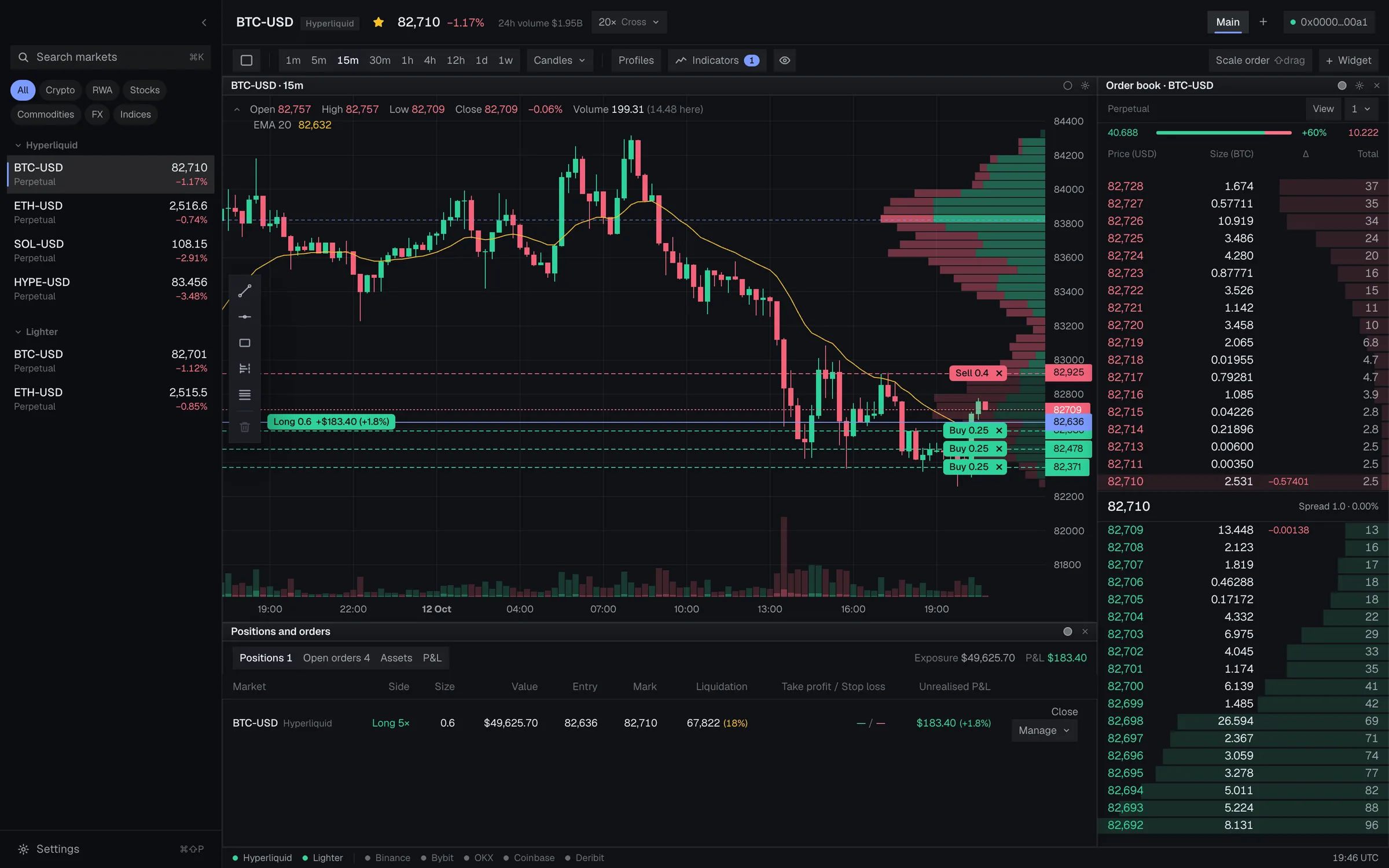
Orders live on the chart.
Press + on the price axis and a ticket opens at that price. Pull a line to move it, click its tag to cancel. Your position, entry and liquidation price sit right where the candles are.
Structure
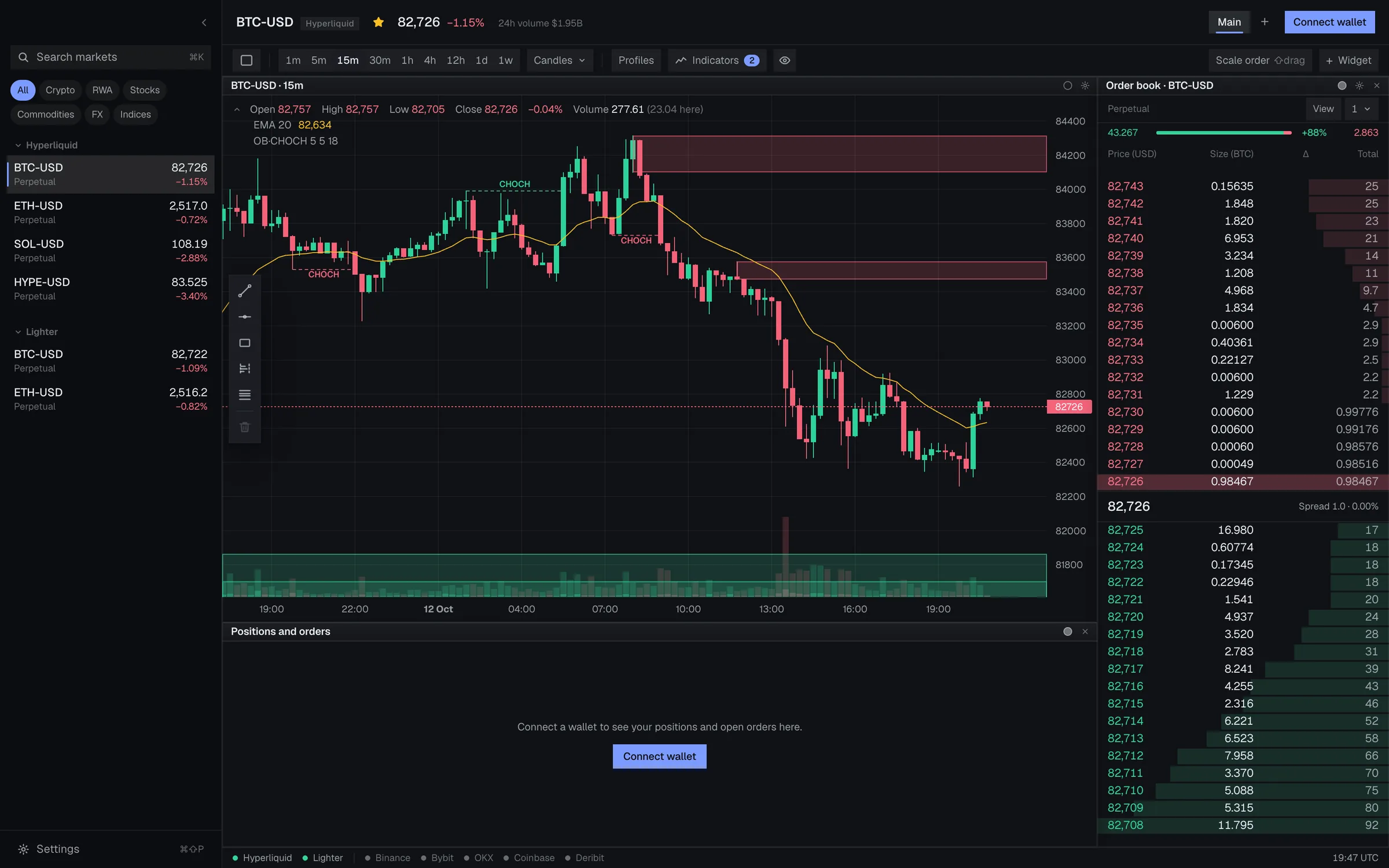
Order blocks and structure.
Order blocks and changes of character are drawn for you, zones that run right until price comes back to them.
Market profile
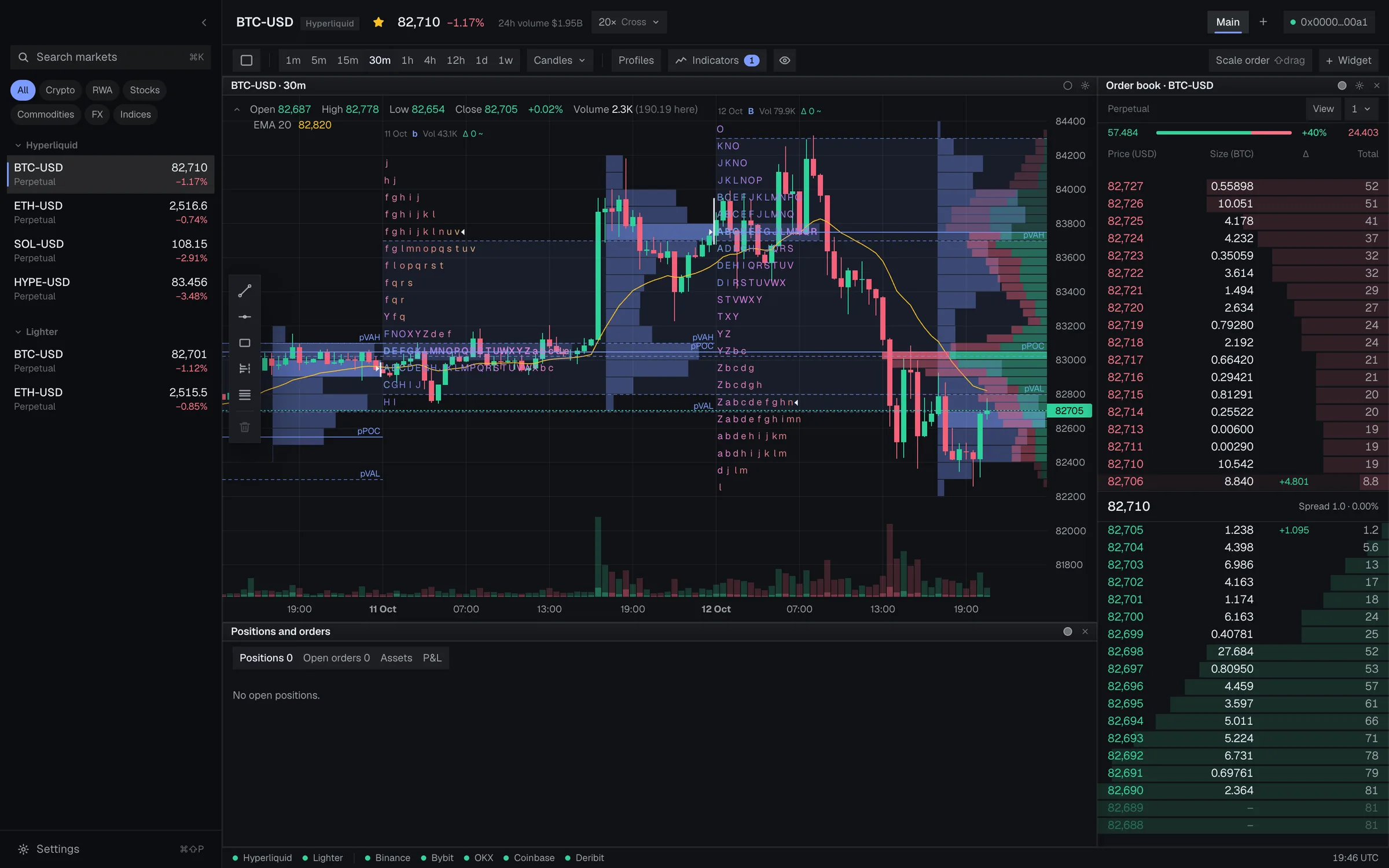
See the shape of the day.
TPO letters or blocks over a session you choose, with value area, point of control and initial balance.
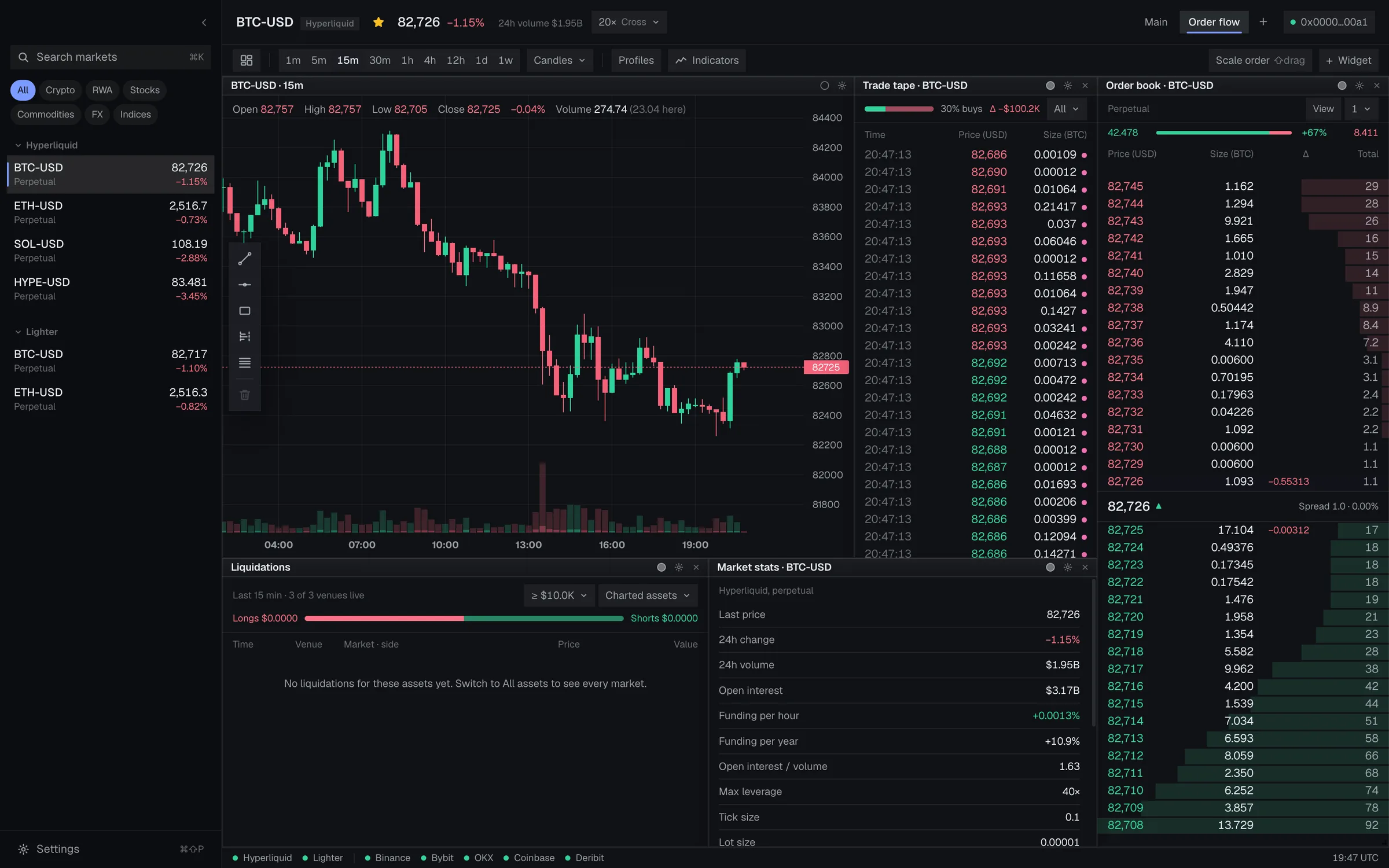
Order flow
See who is trading.
A live tape with running delta, liquidations, open interest and funding, and an order book, all beside the chart.
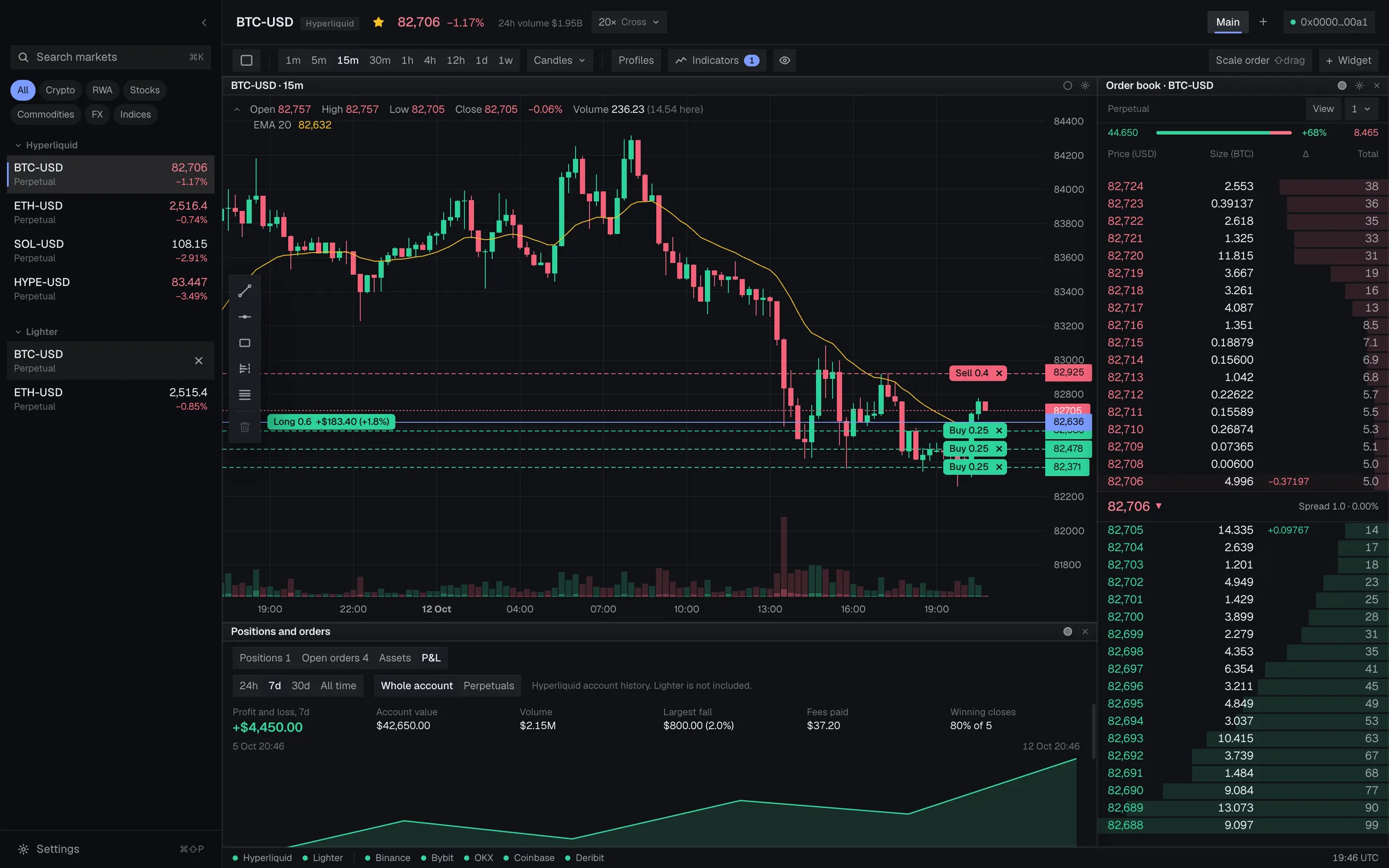
P&L
Know where you stand.
Result, a curve, value, volume, largest fall and fees over a day, a week, a month or all time, and each market's realized result.
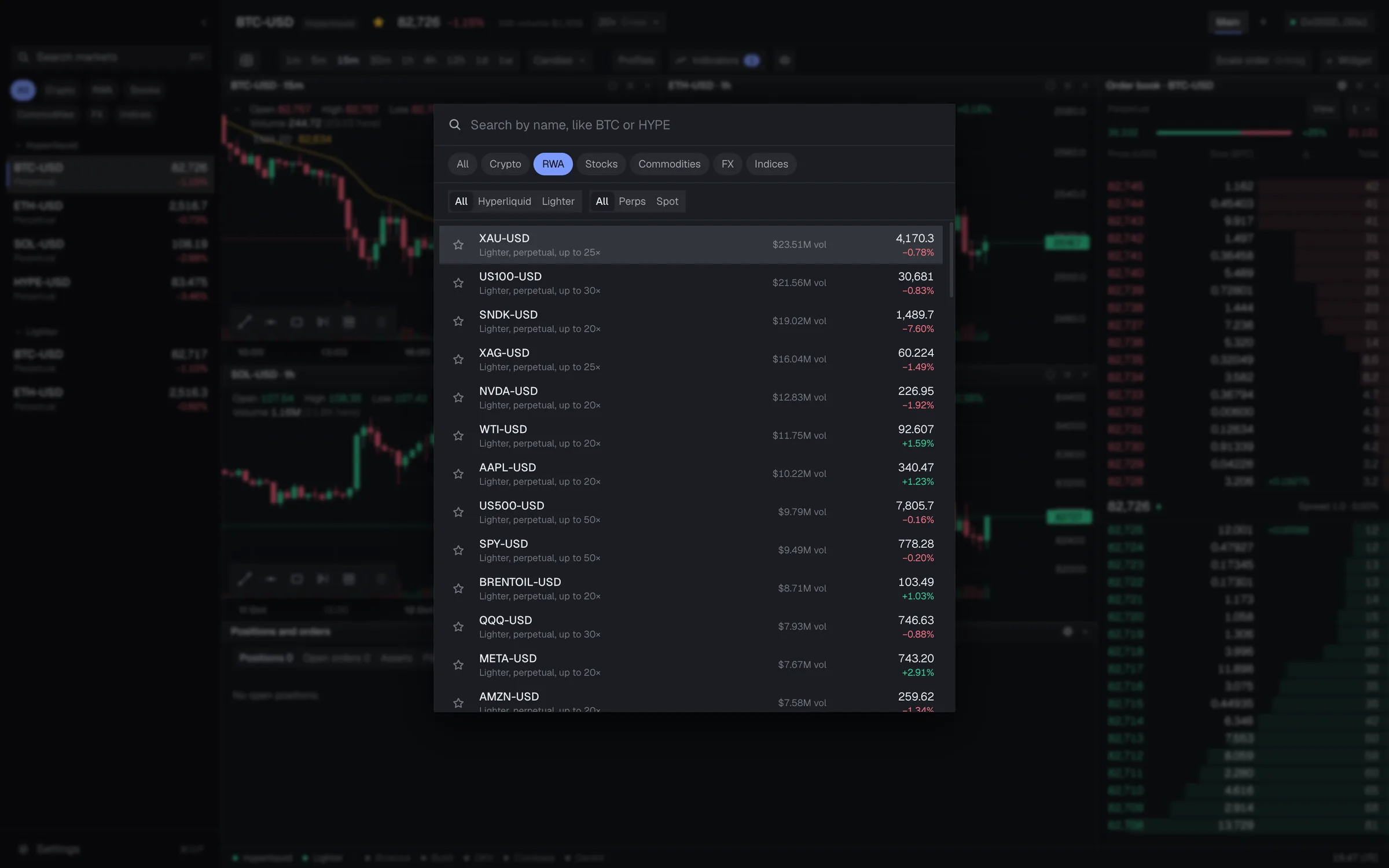
Markets
Crypto, and the rest of the world.
Search crypto, stocks, commodities, currencies and indices from one place, and save the ones you trade.


Alive
Built to be watched.
The book moves with every message, the profile builds as the session does, and structure is marked as it forms. Here is the idea, running.
Order book
Bids, asks and cumulative size, updated on every message. Click a row and a limit ticket opens at that price.
Market profile
TPO letters or blocks build period by period. Value area, point of control and initial balance mark where the market agreed.
Order blocks
A zone is drawn where a move began, structure breaks are labelled, and the zone runs on until price comes back.
Illustrations of how these modules behave. Screenshots of the app itself are everywhere else on this page.
In motion
The real thing,
recorded.
Short loops from the app itself, with live market data.
Order flow, live
The tape, the book and the chart move together, on every message.
Scale orders
Hold Shift and drag a range on the chart. Choose how many orders and how to size them.
23 themes
Switch the whole terminal in a click, and follow your Mac if you like.
Orders and positions
Your orders.
Right where you look.
Drag across a range to lay a scale order over it in one go. Every open position has a Manage menu: close a quarter, half or all at the market, rest a limit that only reduces it, or reverse it in one step.


Exchanges
Two exchanges.
One terminal.
Hyperliquid
Perpetuals and spot. Limit, scale and post-only orders from the chart, with leverage you can change in a click.
Lighter
Perpetuals, including stocks, commodities and currencies. Orders move in place when you drag them, and scale orders go out as a single batch.
Ladder and order form
Built like
an app.
A price ladder with room to read, a step size you choose and columns in your order. Panels run edge to edge or float as cards, and drag by their title to rearrange: the others make room, so nothing is ever pushed out of sight.

Multi-chart trading
Trade many markets
at once.
Put up to sixteen charts in one window, each on its own market on Hyperliquid or Lighter, and place, drag and cancel orders on any of them. Link charts by colour so they follow one market, and save a layout for each workspace.

Modules
Pieces you arrange.
Every panel is a widget. Add the ones you need, drag them where you want them, and keep a layout per workspace.
Chart
Candles and bars, 25 indicators, drawing tools that stay with each market, and orders you can drag.
Order book
Click a row to open a ticket at that price. Your own orders are marked, and a bar shows the imbalance.
Price ladder
Roomy rows, a step you choose, columns in your order, and one-click orders when armed.
Order form
Limit, market and scale tabs, filled in for you when you Shift-drag a range on the chart.
Market profile
TPO letters or blocks, volume profile, value area, point of control and initial balance.
Order blocks
Order blocks and structure shifts, drawn on the chart and extended until price returns.
Trade tape
Every trade as it happens, with running buy and sell delta.
Order flow
Net buying and selling and cumulative delta across the busiest markets, over 5 minutes to an hour.
Liquidations
A live feed from Binance, Bybit and OKX, for the assets on your charts or for all of them.
Market stats
Price, change, volume, open interest, funding and limits for the market you are on.
Market overview
Every market at a glance: volume, open interest, movers and how each category is doing.
Positions and P&L
Entry, mark, liquidation price and profit, a Manage menu, assets across exchanges and a P&L tab.
Themes
Make it yours.
23 themes come with it, from Nightfall and Daylight to Nord, Gruvbox and Tokyo Night, with colour-blind safe pairs. An editor lets you change colours, type and corners, and it can follow your Mac’s appearance.

Dark
Light
Colour-blind safe
Fast, and yours
Keyboard first.
Keys stay yours.

Command palette
Press ⌘⇧P to run any command or jump to a market. Every shortcut can be changed.

Your wallet signs. The app trades.
The app’s own key can place and cancel orders, never withdraw. Your wallet approves every deposit, move and withdrawal.
New in 0.8
Recently.
P&L tab
In Positions and orders, from Hyperliquid's account history: result, curve, value, volume, largest fall, fees, and each market's realized result.
More venues in order flow
Order flow now counts Binance, Bybit and OKX too, over one connection per venue.
A calmer toolbar
Regrouped by what is drawn together and what are tools, with a settings gear on each widget's title bar and a lighter starting profile.
A better first launch
It asks for chart bars alongside the market list.
Features
The details.
Limit orders
Press + on the price axis, or click a row in the order book.
Drag to move
Pull an order line to a new price. On Lighter it changes in place.
Scale orders
Hold Shift and drag a range on the chart, choose how many orders and how to size them, and place them together.
Price ladder
Roomy rows, a price step you pick per market (1, 2, 5, 10 and up), columns you can reorder and hide, and one-click limit, post-only or market orders when armed. Trades and the best bid and ask move it on every message, not twice a second.
Order form or chart tickets
Enter orders in floating tickets on the chart, or in a built-in order form with limit, market and scale tabs. Your choice, in Settings.
Flat or panelled
Run the panels edge to edge with square corners and compact text like a desktop app, or float them as cards. Corners and density are yours to set.
Post only, reduce only
Set either on any order, from the ticket.
Positions and orders
Entry, mark, liquidation price and profit, with one-click cancel.
25 indicators
Moving averages, RSI, MACD, Bollinger, Supertrend, VWAP, anchored VWAP, order blocks and structure, and more.
Drawing tools
Trend lines, levels and ranges that stay with each market.
Up to 16 charts
Tile charts, books and feeds in a grid, and save a layout per workspace.
Price alerts
Set a price and get a chime and a notice when the market reaches it. Alerts show as lines on the chart.
Rearranges as you drag
Drop a panel onto another and they trade places. Resize one and its neighbours give way, never below their smallest size.
Order flow across markets
Net buying and selling and cumulative delta across the busiest Hyperliquid markets, over 5 minutes, 15 minutes or an hour.
Market overview
Every market at a glance: volume, open interest, movers and how each category is doing, sortable and one click from a chart.
Liquidations that match
The liquidation feed shows only the assets on your charts, or every asset if you prefer.
Assets in one place
Your wallet, Hyperliquid and Lighter balances in one table. Deposit USDC to either exchange, move it between spot and perps either way, and withdraw to your own wallet, all from the app. Anything it can't do, it hands to Hyperliquid's own site.
Leverage in a click
Set leverage with a slider or a quick pick up to each market's limit, cross or isolated, from the header or any ticket.
Manage open positions
Close a quarter, half or all at the market or at a limit price, or reverse the position in one step.
Crypto and real-world markets
Filter by crypto, stocks, commodities, FX and indices, in search and in your saved list.
Updates itself
HyperTrader checks for new signed versions and installs them when you choose to restart.
Command palette
Press ⌘K to jump to a market or run any command. Every shortcut can be changed.
Saved markets
Pin the markets you trade, search the rest, on both exchanges.
23 themes
Light, dark, colour-blind safe, and an editor for the rest.
P&L at a glance
Result, a curve, account value, volume, largest fall, fees and each market's realized result, from Hyperliquid's own account history.
Choose your data
Pick the venues that feed order flow and profiles, in Settings.
Keys stay yours
Your wallet signs the approvals and every deposit, move and withdrawal. The app's own key can trade, never withdraw.
Questions
Questions
Can HyperTrader move my funds?
Not on its own. It trades with a key created on your Mac that can place and cancel orders, and that key cannot withdraw or transfer funds. The transfers the app can ask for are a USDC deposit to your own Hyperliquid account, a move between your spot and perps accounts, and a withdrawal to your own wallet, and your wallet must approve each one. Its keys never leave it. Withdrawals have had less real-world use than trading, so try a small amount first.
What does it cost?
The app is free, and it adds no fee of its own to your orders. You pay only each exchange's own trading fees, plus network fees when you deposit, and Hyperliquid's own $1 fee when you withdraw.
Which wallets work?
Browser wallets such as MetaMask and Rabby, through a page served on your own computer, or any wallet that supports WalletConnect on your phone.
Which exchanges can I trade on?
Hyperliquid (perpetuals and spot) and Lighter (perpetuals, including stocks, commodities and currencies). Binance, Bybit, OKX, Coinbase and Deribit feed market data such as order flow and liquidations, and you choose which in Settings. You cannot trade on them from HyperTrader.
Why can't I trade on Lighter?
Lighter does not accept trading from some regions. If an order is refused for that reason, HyperTrader tells you it is because of your location. Charts and market data still work.
Do I need a wallet to look around?
No. Charts, the order book, market profile, order flow and every market work without connecting anything. Connect a wallet when you want to trade.
How does it update?
HyperTrader checks for new signed versions and installs them when you choose to restart. Every release is signed and notarized by Apple.
Is there a Windows or Linux version?
Not yet. HyperTrader is a Mac app for now, on Apple Silicon and Intel, macOS 12 or later.
Is it finished?
No. HyperTrader is in beta. Trading has been tested end to end on the exchanges' test networks; start with small sizes. Perpetual futures carry risk, including loss of funds.
Put your orders where you can see them.
Not sure which chip? Apple menu, About This Mac. Get the Intel build
Beta. Features can change and rough edges remain. Perpetual futures carry risk, so start small.
HyperTrader is beta software, provided as is. It is not affiliated with Hyperliquid or Lighter. Trading perpetual futures involves risk, including the loss of all funds you put in. Nothing here is financial advice. Exchange and network fees apply.